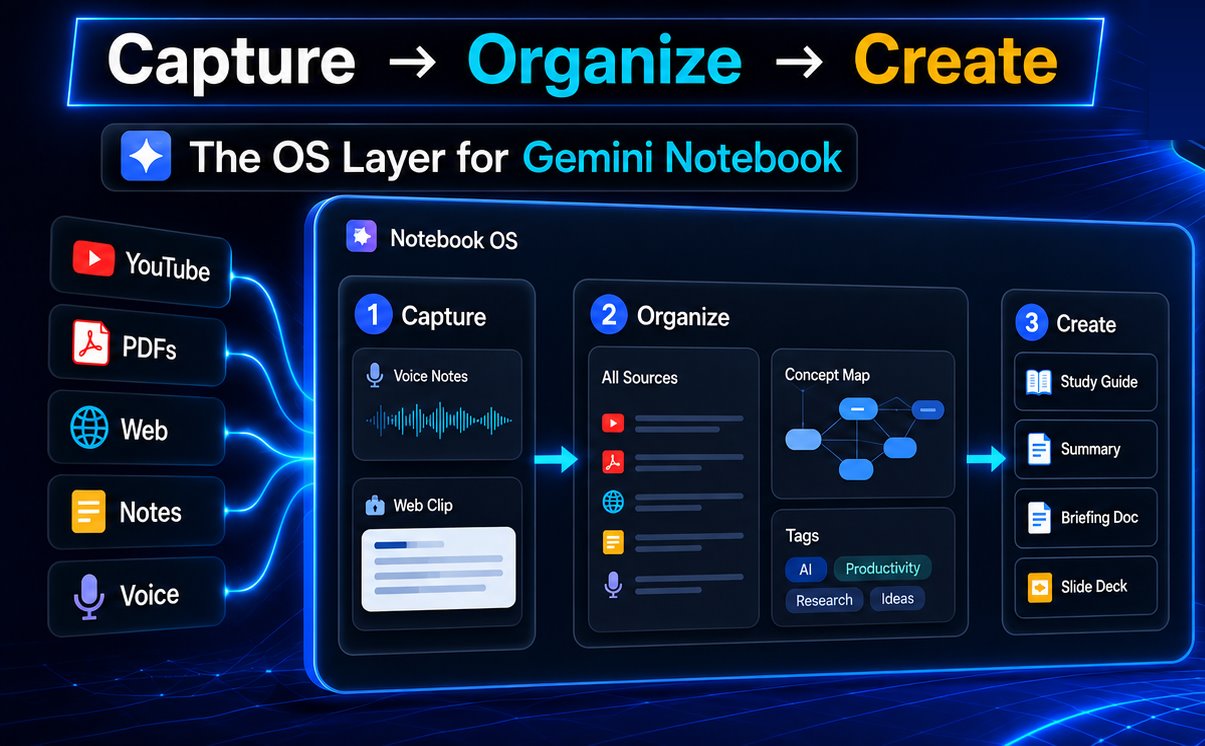
The OS layer
NotebookLM was missing.

Notebook OS is the workflow layer on top of NotebookLM — Studio Recipes, Premium Deck View, Capture Spoken Thoughts, and Academic Search — in one side panel that follows you across Chrome.

See how it works →

Free · No credit card required · Works with your existing NotebookLM account

Walkthrough: all of Notebook OS

Walkthrough: all features of Notebook OS - watch the full tour

9
Artifact types
115
Studio recipes
50+
Output languages
$0
To get started
Why Notebook OS?
Every other extension organizes your inputs.
We power your outputs.

Other NotebookLM extensions focus on what goes in — organizing notebooks, importing sources, managing tags. Notebook OS focuses on what comes out — turning conversations into polished artifacts, capturing ideas the moment they happen, and finding research without ever leaving your flow.

See all features →
CapabilityOther extensionsNotebook OS
Library organization
Bulk source import
Studio Recipes (artifact workflows)
Capture Spoken Thoughts → source
In-panel Academic Search
Web Snip → save images as source
AI Conversation Save → source
Premium Deck View (watermark-free presenter)
Artifact Shelf (cross-notebook pinboard)
Side panel on any page
Core workflows
The workflow engine
NotebookLM was waiting for.
Studio Recipes

Pick an artifact type. Notebook OS reads your chat, writes a customized prompt around your actual notebook sources, and triggers NotebookLM's artifact generator — fully automatically. Audio, Report, Slides, Mind Map, Flashcards, Quiz, and more.

9 artifact typesAI-tailored prompts50+ languages
🎙
Capture Spoken Thoughts

Capture spoken thoughts from the side panel — on any page, anytime. The audio file uploads straight to NotebookLM as a source. No transcription step, no external app. The fastest path from spoken thought to notebook.

Any Chrome pageDirect audio upload
🔬
Academic Search

Search peer-reviewed research without opening a new tab. Find papers, preview abstracts, check citations — then add directly to your active notebook. The research step that used to interrupt your workflow, removed.

Peer-reviewedOne-click import
★ NEW · PRO

Premium Deck View.
Present NotebookLM slides like Gamma.

NotebookLM makes the slides. Notebook OS makes them presentable — a full-screen, distraction-free presenter that runs straight from your notebook, with the watermark quietly removed.

🚫
Watermark, gone

The “NotebookLM” corner mark is hidden on the presenter stage — clean enough to screen-share, record, or project. (Pro)

🖥
True full-screen stage

Dark theater, centered slide, hover chevrons, auto-hiding HUD with a slide counter and progress bar.

⌨️
Keyboard-first

Hit P to present, then drive with Space F Esc.

Read the deep dive →
Strategy · 04 / 12

Three bets for the next quarter

04 / 12
⛶ F
Press Esc to exit · No watermark in view
Everything in the panel
One panel. Works anywhere.
Docked to Chrome, available on every page. Everything you need is one click away — without losing your place.
🖥
Premium Deck ViewNEW
Full-screen, watermark-free presenter for NotebookLM slide decks. Press P and present.
📌
Artifact Shelf
Pin audio, slides, reports and mind maps to a shelf and reopen any of them in one click.
📸
Web Snip
Capture images from any web page and save them directly as a NotebookLM source. Unique to Notebook OS.
💬
AI Conversation Save
Save brainstorming conversations from any AI assistant as a NotebookLM source — no copy-pasting.
📚
Prompt Library
23 knowledge-worker prompts built in. Save your own. Inject into chat with one click.
📝
Note Studio
Rich-text notes on any web page, saved directly to any NotebookLM notebook.
🎬
YouTube Transcript
Pull full transcripts from YouTube videos and add them as a notebook source.
🗺
Concept Map
Generate visual knowledge maps directly from your notebook content.
🗂
Library Enhancements
Folders, tags, real dates, cached summaries, and a visual Library Map.
⌨️
Keyboard Shortcuts
Every core action is keyboard-accessible. Hands on keyboard, never on the mouse.
🔄
Auto-Save Draft
Your note persists between sessions. Close the panel, come back — it's still there.
🌐
Language Support
Switch artifact output language independently from your notebook's language.
Use cases
Built for how knowledge workers
actually work.
Scroll for more →

Each one is a small chain of Notebook OS features working together — from source to finished artifact.

Course learners
Turn a YouTube playlist into a deck you can present
Mine a whole playlist for what matters — then teach it from clean slides.
1
Search the playlist’s videos with YouTube Search and add them as sources
2
Generate a slide deck with a Studio Recipe
3
Present it watermark-free in Premium Deck View
Researchers
From literature to a conference-ready talk
Find the evidence and present it — without ever leaving the notebook.
1
Find papers with Academic Search and add them to your notebook
2
Build presentation slides with a Studio Recipe
3
Present them in Premium Deck View — no watermark
Deep readers
Read a paper, capture your thinking, hear it back
Turn an active reading session into a notebook you can listen to.
1
Open the PDF in your browser and read
2
Capture Spoken Thoughts as you go and Web Snip the key graphs
3
Save it all to NotebookLM and generate an Audio Overview to listen back
Evidence-based readers
Appraise a new paper — neutrally — by ear
Get a balanced read of a study while you commute or do the dishes.
1
Upload the new academic paper to NotebookLM
2
Pick the Critical Appraisal recipe in Studio Recipes
3
Listen to the Audio Overview for a balanced, neutral take
Parents
Make a story-time tale from any topic
Spin a gentle, kid-friendly story out of whatever they’re curious about.
1
Add a topic or source to a notebook
2
Choose the Kids Story recipe in Studio Recipes
3
Play the Audio Overview at story time
Parents & teachers
Explain a topic to kids with a playful deck
Make a bright, simple slide deck and teach straight from the screen.
1
Add the lesson topic or sources
2
Generate a kids’ explainer deck with a Studio Recipe
3
Teach from full-screen Premium Deck View
Researchers
From 20 papers to a literature review
Collect, synthesize, and actually remember a body of work.
1
Pull papers with Academic Search
2
Draft the review with a Studio Recipe report
3
Lock it in with a Flashcards recipe
Writers & creators
Capture ideas the moment they strike
Never lose a good thought between the shower and the desk.
1
Record a thought anywhere with Capture Spoken Thoughts
2
Save AI brainstorms with AI Conversation Save
3
Let it all become a source in NotebookLM
Students
Turn a lecture into notes, a quiz & a deck
Study smarter from a single recording or video.
1
Capture the lecture by voice or pull a YouTube transcript
2
Generate Study Notes and a Quiz with Studio Recipes
3
Revise from a clean Premium Deck View
What users say
Real knowledge workers. Real workflows.

I review 20+ papers a week. Academic Search alone saves me an hour of tab-switching every day. The Flashcard Recipe is how I actually retain what I read.

M. Kim
M. Kim
PhD Candidate, Biomedical Engineering

Capture Spoken Thoughts is criminally underrated. I commute 40 minutes each way. By the time I open NotebookLM, my thoughts are already in my notebook as a source.

R. Larsson
R. Larsson
Independent Researcher

Studio Recipes builds the deck, Premium Deck View presents it. I went from notebook to a clean, watermark-free pitch on the projector without ever exporting to PowerPoint.

J. Tran
J. Tran
University Lecturer
Free to Install · No credit card required

Your NotebookLM is waiting
for its operating system.

Install Notebook OS and unlock Studio Recipes, Capture Spoken Thoughts, and Academic Search in under 60 seconds.